The guided tour
Look inside before you move anything.
The inbox, the compose window and the reply companion, full screen, no account needed.
Click a point to read what it does. This is the dashboard you get on the free plan — the
same one your MX record would be pointing at ten minutes from now.
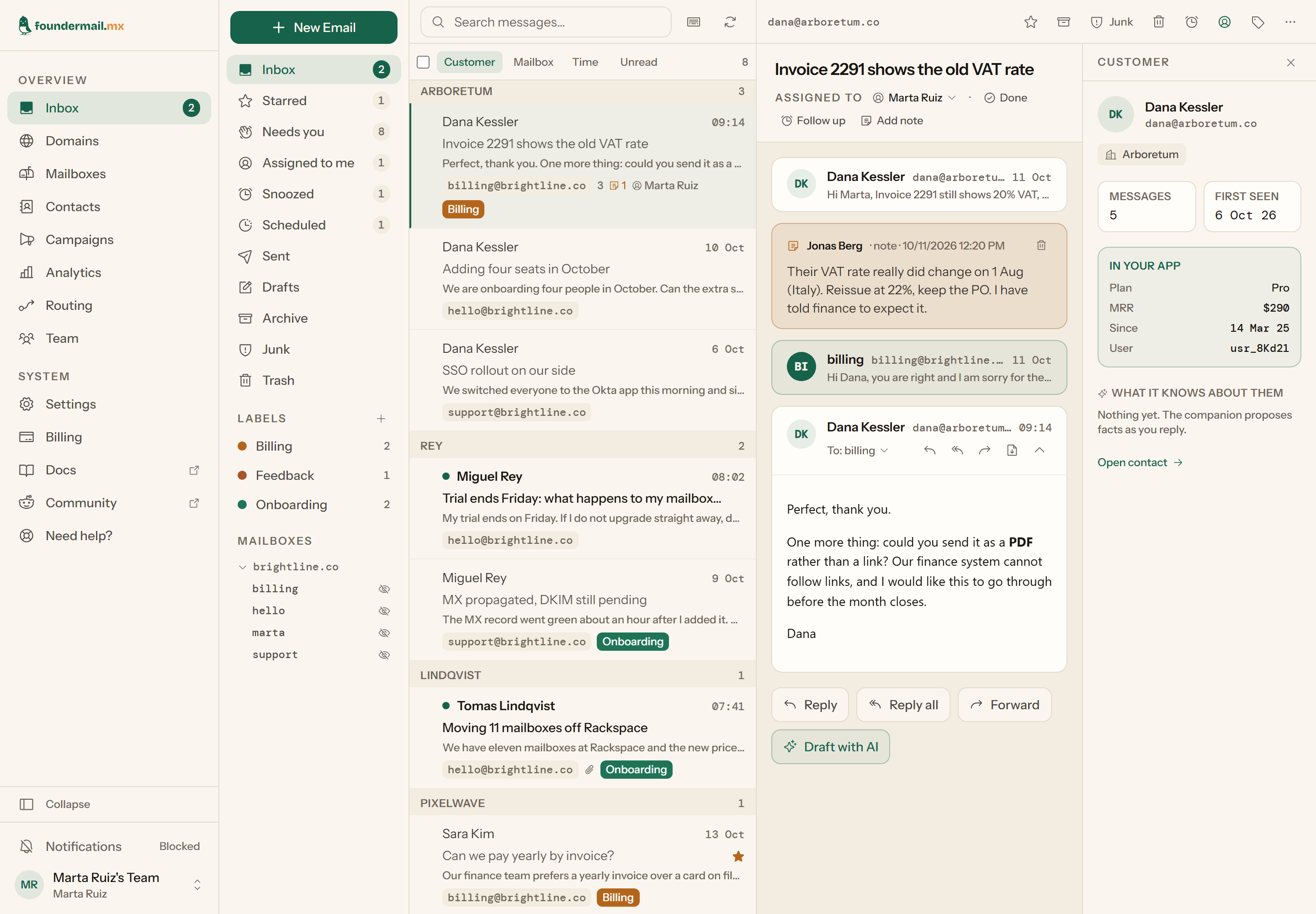
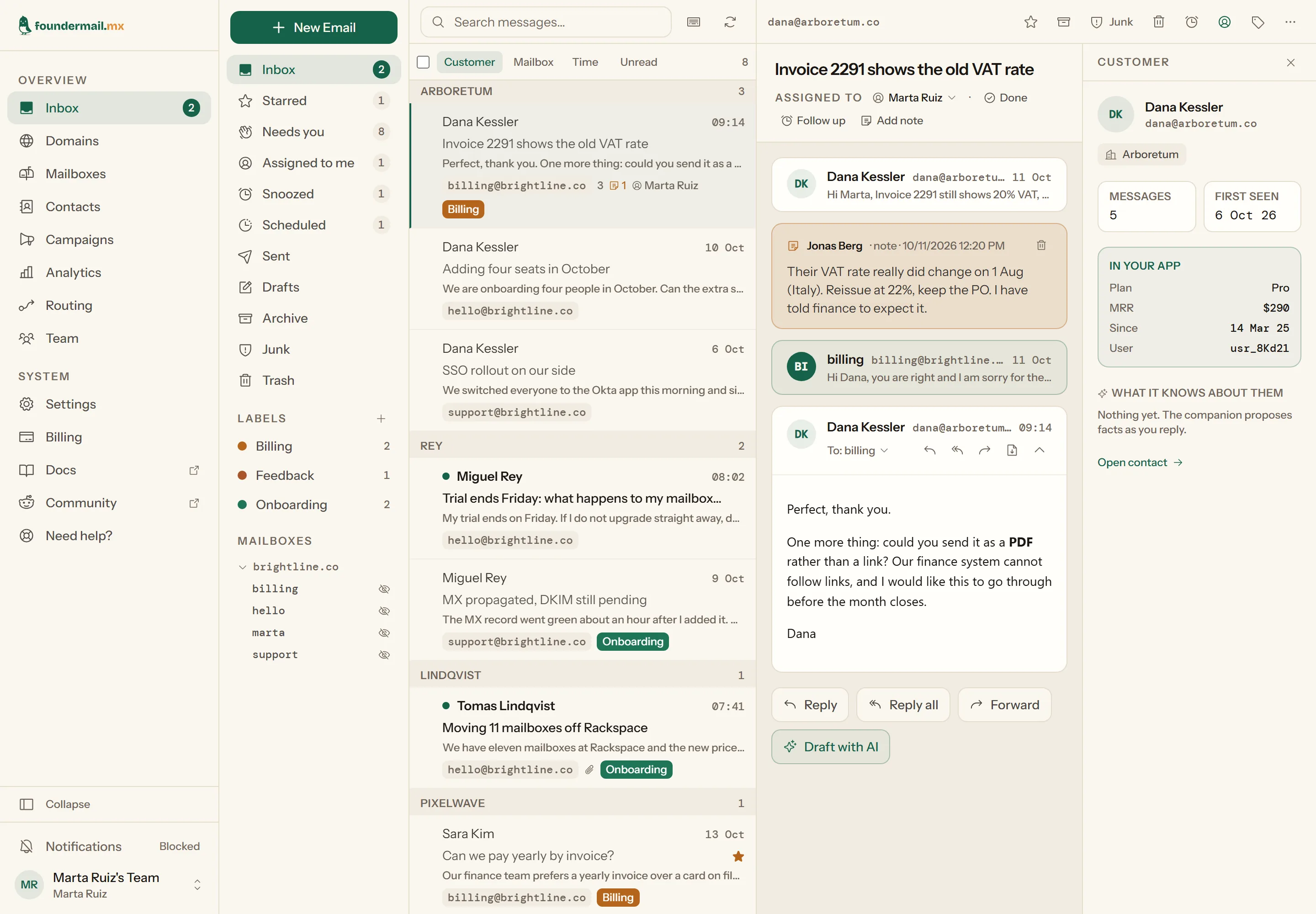
The inbox Write from any mailbox One New Email button; the From menu lists every mailbox on every domain you host. Views that are a workflow Inbox, Starred, Needs you, Assigned to me, Snoozed, Scheduled, Sent, Drafts, Archive, Junk, Trash. “Needs you” is every thread whose last word was the customer’s; Scheduled is what you have written and told to leave later. Labels, in your colours Tag a thread from the toolbar or with a keystroke, then filter the whole account by label. Search across every mailbox Full-text search over subject and body, in all your mailboxes at once, not one at a time. Group by customer, mailbox or time The list is one list. Switch how it is grouped and the same threads regroup under the person, the address, or the day. The row tells you what you need Unread mark, which of your addresses it came to, an attachment mark, labels, who it is assigned to. Every action, one click or one key Star, archive, junk, delete, follow up later, assign, label. The same actions apply to a multi-selection. Assign, follow up, mark done Give a thread to a teammate, snooze it until Monday, or mark it Done. Done archives; a new reply from the customer reopens it. Notes your customer never sees Internal notes sit in the timeline next to the messages, signed by whoever wrote them. Your own data beside the thread Plan, monthly revenue, sign-up date and user id, pushed from your product through the API and shown next to every conversation with that person. Ask for a first draft Draft with AI opens the reply companion beside the thread with an answer already written. Writing an email It floats over the inbox The thread you are answering stays on screen while you write it, so you can keep reading without losing the draft. Choose the sending address Any mailbox on any of your domains. The reply goes out signed by that domain’s DKIM. Recipients as chips, with typeahead Contacts you have heard from are suggested as you type. Cc and Bcc are one click away. Attachments Files are kept with the sent message so you can open them again later. Send now, send later, or save the draft The arrow beside Send schedules the message for tomorrow morning, Monday, or any time up to 90 days ahead, and you can cancel it until it leaves (one message waiting at a time on Free, ten on Plus, unlimited on Pro and Scale). Drafts save themselves as you write and appear in your IMAP client’s Drafts folder too. The reply companion It reads what you would read The companion drafts from the thread, the customer card beside it and what you have told it about this customer before. A reply in your voice A whole answer, written the way you write, ready to use as it is or to change. Nothing leaves without you Use this draft opens the ordinary reply window with the text in it. You read it, change it and press Send yourself. It asks instead of inventing When the reply needs a fact it does not have, it asks you, then drafts again with your answer. It never makes one up. It proposes what to remember Facts worth keeping about a customer are offered for you to keep. Nothing is remembered without your click. An allowance on every plan Each plan includes an amount of AI a month, shown under the panel as a percentage used. The feature is experimental.
Back to the inbox
The inbox
New Email Draft with AI Click it 1 2 3 4 5 6 7 8 9 Click it 1 2 3 4 5
1 2 3 4 5 6
Click a point · ← → to step
· Esc to leave
Hosted email for founders and small teams. Your domain, unlimited mailboxes, real SMTP and
IMAP on every one, and a dashboard that groups it all by customer.
Questions? Write to us
© 2026 Webco S.r.l.s. Made with ❤️ in Italy
Say hello
A question before you sign up, or something that is not working: write it here and a person
answers by email.