
Re: Invoice 2291 shows the old VAT rate — could you send it as a PDF? billing@
Adding four seats in October — same invoice as the renewal? hello@
SSO rollout on our side — worked first try, thank you support@
Hosted email · Your own domain · Unlimited mailboxes
hello@, billing@, support@ and everyone's personal address — real mailboxes on your domain, with SMTP and IMAP on every single one. Then a dashboard that shows you the person, not the mailbox, plus a REST API and an MCP server so your own software and your AI assistant can read the same mail.
Unlimited mailboxes and domains on every plan. The free plan is a plan, not a trial.
We launched this year, so there is no wall of customer logos to show you. Here is what we will tell you instead.
The dashboard
Every mailbox on your domain, every teammate and every customer in one place that knows who is writing. This is the real thing, rendered from a working account, not a mock-up.
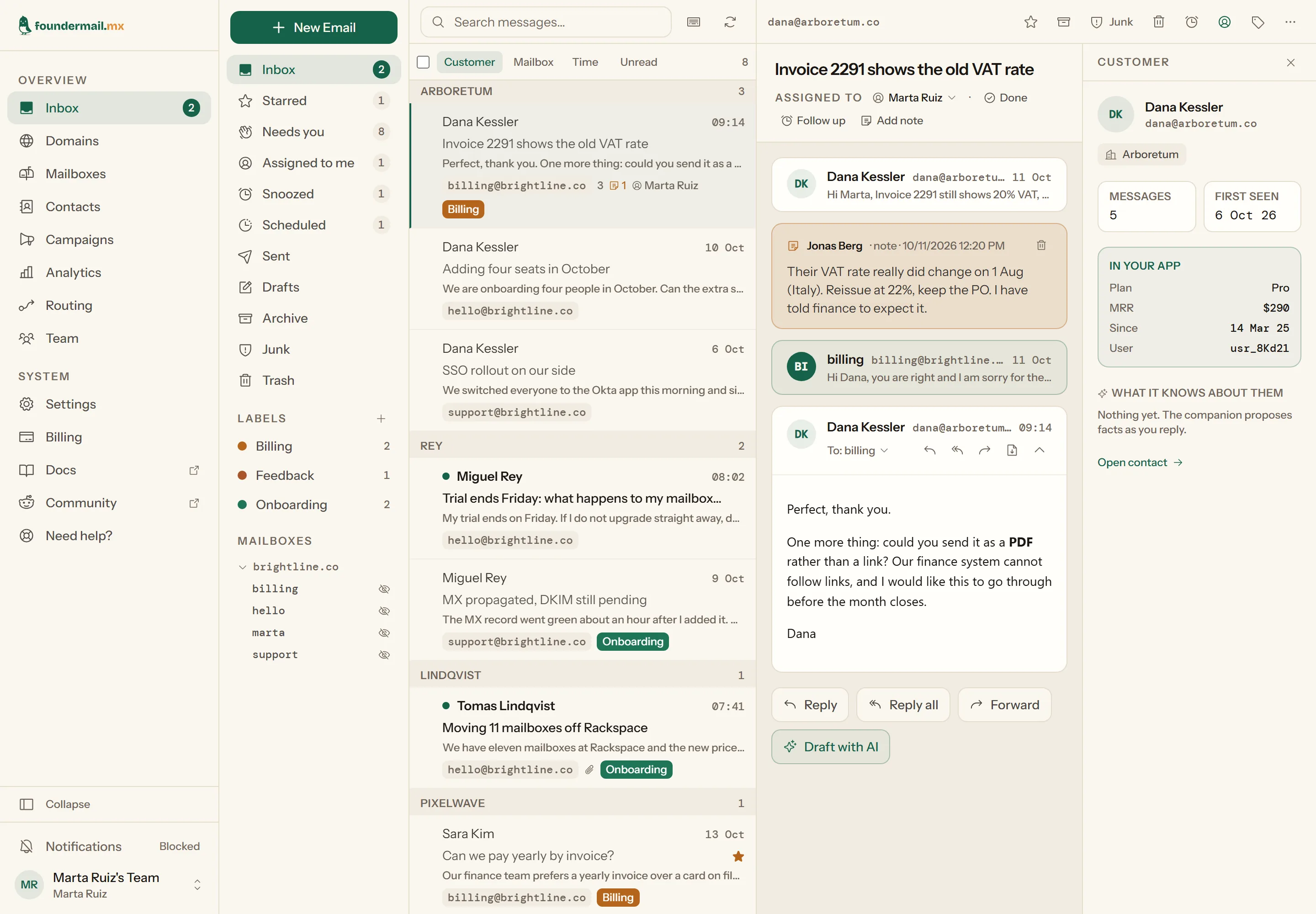
One screen holds the whole workflow. Views for Starred, Needs you, Assigned to me, Snoozed, Scheduled and Done — where “Needs you” is every thread whose last word was the customer’s. Labels in your own colours, full-text search across every mailbox at once, and a single list you can regroup under the customer, the address it arrived at, or the day. Star, assign, snooze, label or archive from the toolbar or one keystroke, on a thread or a whole selection. Write now and send later: schedule a reply for Monday morning and cancel it any time before it leaves. Internal notes sit in the timeline where the customer never sees them, and your own record of that person — plan, revenue, sign-up date, pushed from your product through the API — sits beside the conversation.
Take the guided tour of both screens

Writing
It floats over the inbox so you can keep reading while you answer. Send from any mailbox on any of your domains — the reply goes out signed by that domain’s DKIM. Recipients are chips with typeahead over the people you have heard from, Cc and Bcc are one click away, and attachments stay with the sent message so you can open them again later. Drafts save themselves as you write, and appear in your mail client’s Drafts folder too.
j/k to move, r to reply, e to archive, s to star, z to snooze, / to search. The full list is in the docs.
HTML is sanitised on the server and rendered in a sandbox. Remote images stay blocked until you ask for them, so nobody learns when you opened their message.
Your own software reads mail and attaches customer records through the REST API; Claude reads threads and writes drafts through the MCP server. Sending is a separate scope you grant on purpose.
Shared and personal
support@ and hello@ belong to everyone. The whole team reads them, assigns threads and leaves notes. Next to them, each person can keep a personal mailbox for the mail that is only theirs.

A shared mailbox is read by everyone on the team. Its threads sit in the one inbox, grouped by customer, with the assignee and the notes on them.
Only that person reads its mail in the dashboard and sees its password. Admins and the owner see that it exists and whose it is, and nothing inside it. Its mail never joins a shared thread.
The owner does everything. Admins do everything but billing. Members get the inbox, contacts, campaigns and their own mailboxes.
Every mailbox, shared or personal, has its own IMAP and SMTP login, so it opens in any mail client too. Personal mailboxes come with the paid plans; the pricing table has how many each person gets. How personal mailboxes work.
The reply companion Experimental
Press Draft with AI in a thread and a panel opens beside it with a reply written in your voice. You read it, change it and send it yourself, or throw it away.
It is off until an owner or admin switches it on for the account. Drafts are written by an AI model, and its provider does not train on your mail. Every plan includes some AI each month, shown as a percentage used; the pricing table compares the plans. How the companion works.

The difference
Dana wrote to billing@ about an invoice, hello@ about her renewal and support@ about SSO. Every other mail host shows you three unrelated threads in three different mailboxes. We show you Dana.
Views
Inbox 3
Needs you 7
Snoozed 1
Scheduled 2
Mailboxes
hello@ 44
billing@ 9
support@ 75
Storage
4.1 of 50 GB
Plan, MRR and user id pushed by your own app.
Addresses verified by inbound mail.
Real protocols
Every address gets its own SMTP and IMAP login, so your mail opens in Apple Mail, Outlook, Thunderbird or anything else that speaks the protocol. No proprietary client, no export ticket. The door you came in by stays open.
Moving in
Two step-by-step guides, each with a price comparison against the other hosts you are probably looking at, and the order to do things in so no mail is lost on the way.
Rackspace Email · price rose in March 2026
Rackspace went from $2.99 to $10 a mailbox. The guide walks through the cutover in order, copies your archive over IMAP, and compares what eleven mailboxes cost at Rackspace, Google Workspace, Fastmail, Migadu and here.
Read the Rackspace guide →Gmail "Send mail as" · ends January 2027
If you receive with Cloudflare and send through a free Gmail account, that setup stops sending as your domain in January 2027. Who is affected, who is not, and how to move to real mailboxes without losing a message.
Read the Gmail guide →Coming from somewhere else? Every IMAP host moves the same way: the migration guide in the docs.
Pricing
Billed per account, never per mailbox · USD · Pay yearly and get one month free
Creating mailboxes is free. Using them is free too. The Free plan is a working business mailbox with SMTP, IMAP and the dashboard; what it caps is volume. Five hundred received and three thousand sent messages a month is a quiet company's month. Plus keeps those allowances and adds room: more storage, unlimited retention, two more seats, and aliases so that info@ and support@ land in one mailbox. When you pass the volume, your business has grown, and that is when Pro starts.
| Plan | Free $0 · not a trial | Plus $4 / mo · $44 / yr | Pro $12 / mo · $132 / yr | Scale $39 / mo · $429 / yr |
|---|---|---|---|---|
| Domains | Unlimited | Unlimited | Unlimited | Unlimited |
| Mailboxes | Unlimited | Unlimited | Unlimited | Unlimited |
| Received / month | 500 | 500 | 15,000 | 100,000 |
| Sent / month | 3,000 | 3,000 | 40,000 | 120,000 |
| Sent / day | 100 | 100 | No limit | No limit |
| Storage, pooled | 1 GB | 15 GB | 50 GB | 250 GB |
| Retention | 12 months | Unlimited | Unlimited | Unlimited |
| IMAP / SMTP on every mailbox | Included | Included | Included | Included |
| Dashboard, customer view | Included | Included | Included | Included |
| Forwarders | 1 | 1 | 5 | Unlimited |
| Aliases | — | 3 | Unlimited | Unlimited |
| Team members | 1 | 3 | 10 | 50 |
| Personal mailboxes, per person | — | 1 | 3 | 5 |
| AI companion / month Experimental | Included | 3× Free | 10× Free | 33× Free |
| Send later, messages waiting at once | 1 | 10 | Unlimited | Unlimited |
| REST API, MCP | Included | Included | Included | Included |
| Webhooks | — | — | 3 | Unlimited |
| Mailing lists and the campaign editor | Included | Included | Included | Included |
| Campaign sends / month | — | — | 5,000 | 25,000 |
| Subscribers | — | — | 2,500 | 10,000 |
| Mailing lists | — | — | 5 | Unlimited |
| Writing to new contacts | On request | On request | On request | On request |
At the limit. Mail is never bounced because an allowance is used up or the storage pool is full: it keeps arriving, and we email you at 80%, 90% and 100% and ask you to upgrade. Sending is the exception: once the month's sent allowance is used, sending pauses until the month resets or you upgrade. Junk never counts.
Writing to new contacts. Every domain can reply to anyone who wrote to it. Writing first is enabled per domain on request, on every plan, after a short review.
AI companion. Experimental. The reply companion is switched on per account by an owner or admin. Drafts and rewrites draw on one monthly amount of AI, shown as a percentage used; how much each plan includes, and how it is measured, may change while it settles. On Free it starts once the account has sent or received 20 messages.
More than 50 people? Get in touch.
Setup
Typical propagation 5–30 min · checked every ten seconds
| Type | Name | Value | Prio |
|---|---|---|---|
| TXT | _foundermail | <the token from your domain page> | — |
| MX | @ | smtp.foundermail.mx | 10 |
| TXT | @ | v=spf1 include:foundermail.mx ~all | — |
| TXT | _dmarc | v=DMARC1; p=none; rua=mailto:dmarc@yourdomain.com | — |
$ dig +short MX yourdomain.com
10 smtp.foundermail.mx.

Ownership  proved
SPF        pass
DKIM       pass  3 CNAMEs, issued when you enable sending
DMARC      p=none  ← monitor first, then quarantine
Anyone can point a domain's MX at us; only its owner can publish the token we give you. Nothing is checked, and no mail is accepted, until it appears. The MX record then routes your mail, and SPF lets receivers trust what you send.
When you enable sending, the domain page issues three DKIM CNAME records and a bounce subdomain, unique to your domain. Copy them from the page, or let the Cloudflare one-click setup publish everything for you.
Add the records at whoever holds your DNS, then leave the page. We re-check every ten seconds and show each one turning green as it lands. Only the holder of a domain can change its DNS, so that part is yours; the checking is ours.
Straight answers
No. It is a working business mailbox with SMTP and IMAP, unlimited addresses and a year of retention. It stays free until your volume says your business has grown: 500 received and 3,000 sent messages a month is where Pro starts.
Yes. You bring the domain, we run the mail. Your address does not change, which is also why ours never can.
You point your MX somewhere else and pull everything over IMAP, the same way you got it here. No export queue, no retention hostage.
Really. A dormant mailbox costs us a database row. We meter the things that do cost money: mail received, mail sent, bytes stored, seats and integrations.
Yes, over IMAP. There is no importer inside the dashboard yet; the migration guide shows the two ways that work today, a mail client or the imapsync tool, and the order to do things in so nothing is lost.
No, and we train nothing on it. Bodies and attachments sit in encrypted blob storage, spam scoring runs on our own infrastructure, and the only third party that sees a message is the delivery provider that carries your outbound mail. The one exception is yours to make: if you switch on the reply companion, the thread you ask it to answer is sent to an AI model, whose provider does not train on it.
Yes. The REST API and the MCP server can send from your mailboxes, and they can also just write a draft for a person to send — a key scoped to drafting alone cannot send at all. Sending goes through the same rules as the dashboard: most domains may only reply to people who have written in, and every message counts against your plan's allowance. It is not a transactional or bulk sender; use a service built for that.
Webco S.r.l.s., a one-founder company in Italy. FounderMail's mail servers are the same code that runs DevInbox, our other product; the dashboard on top is new.
Free plan, no card, unlimited mailboxes. If it isn't better than what you have, the records take two minutes to undo.